
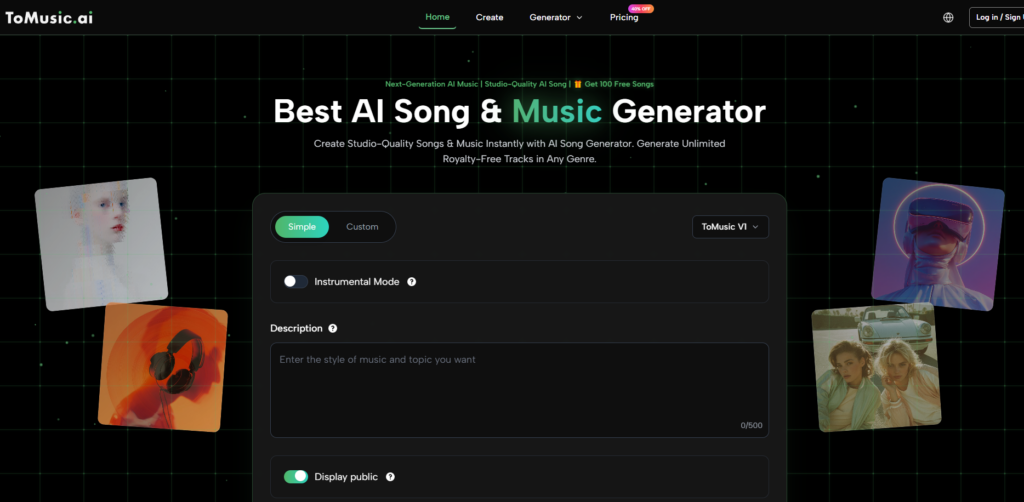
In creative work, the biggest problem is often not having no ideas. It is having ideas that arrive too quickly, too vaguely, or at the wrong time. A hook appears during a work break. A chorus line comes while scrolling social media. A mood for a soundtrack is clear in your head, but impossible to explain to a producer without opening another complicated app. That is the context in which an AI Music Generator becomes interesting. It is not just about replacing musicians or compressing the craft into a button. It is about seeing whether a browser-based system can turn loose intent into usable audio before that intent disappears.
After spending time with ToMusic, my impression is that the product is built around speed first, but not speed alone. The interface suggests a low-friction path into generation, yet it also leaves room for more directed input. That balance matters. Many music tools either feel playful but shallow, or detailed but exhausting. What makes this platform worth examining is that it seems to sit somewhere in the middle: light enough for first-time users, but structured enough to support repeat use.
What The Product Seems Designed To Solve
The platform appears to target a very specific gap in modern content creation. Many users do not need a full digital audio workstation. They need a song draft, a background piece, a jingle, or a vocal track quickly enough to test an idea, publish a post, or support a campaign. In that setting, convenience is not a luxury. It is the main feature.
Fast Drafting Matters More Than Perfect Control
In my observation, a lot of AI music products are judged too early on whether they can fully replace professional composition. That is not the only useful standard. A more practical question is whether the tool can help someone move from blank page to testable result with less friction than before. ToMusic performs well on that question because its core interaction is short: pick a mode, provide musical direction, generate, then review the result.
The Browser Format Changes User Behavior
Because the tool lives in a web workflow, it encourages experimentation in smaller bursts. That matters for solo creators, marketers, and editors who are not trying to build a full album. They are often trying to check whether a concept works. A fast browser loop changes how often people are willing to test.
How My Review Approaches The Platform
This review is not based on the fantasy that every generated song should sound like a finished commercial release. I am looking at something more useful: clarity of setup, amount of controllability, practical value of outputs, and how credible the workflow feels for repeated use. By that standard, ToMusic is easier to take seriously than many novelty-first generators.
Three Things I Looked For First
Whether The Interface Reduces Hesitation
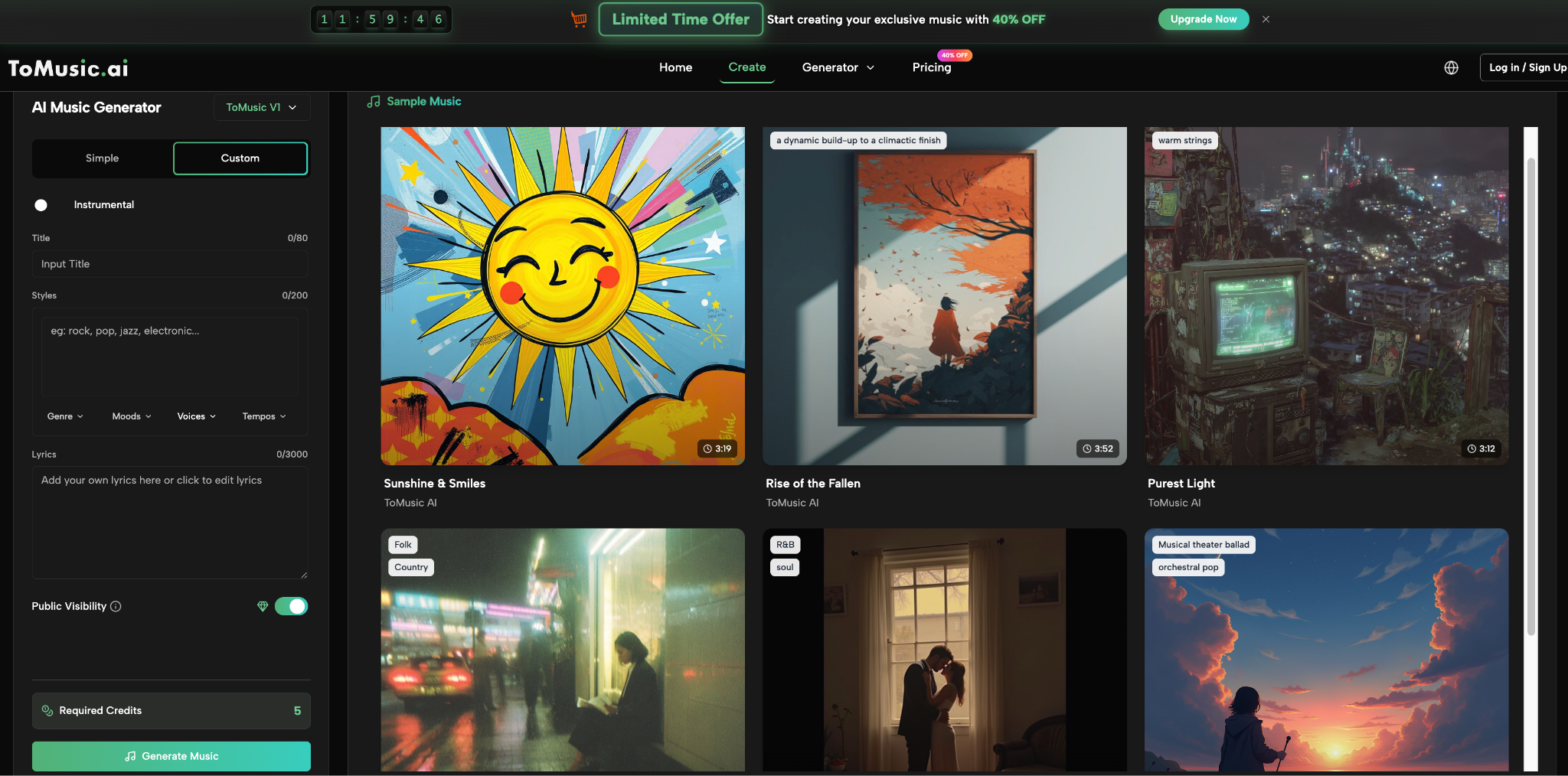
The first sign of a usable music tool is whether it lets a new user start without needing a tutorial. Here, the creation page does a decent job. It exposes mode choices like Simple, Custom, and Instrumental, then offers structured fields such as title, style direction, lyric input, and selectable tags for genre, moods, voices, and tempos.
Whether The Tool Supports Different Creative Intent
A useful generator should not force every user into the same type of output. Here, the platform makes room for both instrumental work and lyric-led songs. That is important because soundtrack generation and song generation are related, but they are not the same task.
Whether The Business Model Matches Exploration
The free plan matters because it determines whether testing feels safe. ToMusic publicly presents a one-time free quota of 100 songs, which lowers the emotional cost of trying multiple drafts before deciding whether the tool is worth deeper use.
How The Workflow Actually Feels
The basic process is short enough that most users could understand it in minutes. That alone gives the product an advantage over tools that hide their capability behind too many panels.
Step One Starts With Mode Selection
You begin by choosing how directed you want the generation to be. The visible choices suggest a lightweight mode for speed, a more custom path for specificity, and an instrumental option for users who do not need vocals.
Step Two Turns Intent Into Structured Input
This is the part that matters most. Rather than relying only on one prompt box, the platform uses fields for title, styles, and lyrics, plus tags for genre, mood, voice, and tempo. That design choice makes the tool feel more like guided composition than blind prompting.
Step Three Generates The Draft Quickly
The generation action itself is straightforward. In practical terms, this is where the product either keeps momentum alive or kills it. The simplicity of the button-to-result flow is one of ToMusic’s stronger points.
Step Four Continues Inside The Music Library
After generation, the workflow moves into My Music Studio, where outputs can be reviewed and managed. That extra layer matters because music generation is rarely one-and-done. Most users want comparison, not just creation.
Where The Product Feels Most Convincing
The platform is strongest when used as a drafting and iteration tool rather than as a promise of instant masterpiece creation. That may sound modest, but it is actually a strength. Products become durable when they support realistic behavior.
Instrumental Use Cases Make Immediate Sense
For background scores, mood tracks, and short branded music needs, the value proposition is easy to understand. You do not always need a perfect signature composition. Often you need a directionally correct piece that supports the visual or message.
Lyrics Make The Tool More Than A Beat Maker
The presence of lyric input shifts the platform upward in usefulness. It suggests that ToMusic is trying to participate in song structure, not only atmosphere. That is one reason the Text to Music positioning feels credible instead of decorative.
Model Layering Suggests Product Maturity
The site presents a multi-model structure, with public references to different model tiers and annual-plan access to all five models. In my view, that is a meaningful signal. A model ladder usually indicates that the team sees music generation as a family of tradeoffs rather than a single universal engine.
What The Platform Gives You In Practice
A review becomes clearer when the experience is broken into advantages and limits instead of vague praise.
|
Aspect |
What Stands Out |
Why It Matters |
|
Entry friction |
Low |
New users can start quickly |
|
Input control |
Moderate to strong |
More guidance than one-box prompting |
|
Use case range |
Broad |
Works for songs and instrumentals |
|
Export options |
Practical |
MP3 and WAV support are useful |
|
Advanced tools |
Present in paid tiers |
Stem extraction adds flexibility |
|
Value for testing |
High |
Free quota encourages exploration |
What Feels Less Certain Or Less Mature
A fair review should also note where the product may need user patience. AI music systems are still interpretation engines, which means direction does not always become output in a perfectly linear way.
Prompt Quality Still Shapes Outcome
In my testing of tools like this category overall, good results usually come from specific musical language, not vague adjectives. The platform helps by adding structured fields, but it still depends on the user knowing what kind of track they want.
Iteration Is Part Of The Real Cost
The free quota is generous enough for experimentation, but experimentation is still work. Users expecting perfect first outputs may feel disappointed. Users who understand that several passes are normal will likely get more value.
Commercial Confidence Depends On Context
The platform advertises royalty-free and commercial-license language in its pricing structure, which is useful. But in serious brand work, teams should still match the output to campaign standards, voice consistency, and legal review habits.
How Different Users Might Experience It
The same product can feel very different depending on who is using it.
For Solo Creators
This is likely the easiest audience to imagine. A solo creator benefits from fast ideation, low setup friction, and an easy way to produce multiple music directions without leaving the browser.
For Small Marketing Teams
The platform could be useful for scratch tracks, campaign mood testing, social intros, and early concept work. It may save time before a team decides whether a final polished production is necessary.
For Musicians And More Demanding Users
The product may work best as a drafting companion rather than a full replacement for established production workflows. Serious users may appreciate it most when using it to explore directions, not when asking it to do every job.
How The Paid Structure Changes The Evaluation
Pricing always changes the meaning of a review. A music tool that is fun for free but weak in paid tiers is different from a tool that reveals its stronger workflow only after upgrade.
The Free Tier Is Better Than Pure Teasing
A one-time 100-song quota is enough for real experimentation, not just a token demo. That gives users room to discover whether the interface and output logic actually fit their workflow.
Paid Tiers Add Real Workflow Benefits
The paid plans move beyond more generations. They also add longer songs, access to more models, concurrent generations, private generation, WAV downloads, and stem-oriented utilities. Those are workflow features, not just marketing extras.
Advanced Users Benefit From Parallel Testing
Concurrent generation matters more than it sounds. If a team is comparing moods, tempos, or lyric versions, parallel output speeds up decision-making in a real way.
My Final Evaluation Of The Experience
ToMusic is most impressive when judged as a practical creation layer between idea and final selection. It is not convincing because it promises magic. It is convincing because the workflow is clear, the free entry point is meaningful, and the platform offers enough structure to make iteration feel purposeful rather than chaotic.
The product will not remove the need for taste, revision, or musical judgment. In some cases, it may produce results that are close but not quite right, which means another pass is necessary. Still, that is not a fatal weakness. It is the normal cost of working with generative systems. What matters is whether the cost feels productive.
In this case, I think it often does. For creators who want to turn rough musical intent into something audible quickly, ToMusic feels less like a gimmick and more like a usable drafting environment. That is a meaningful distinction, and it is the main reason the platform deserves a serious look.
More Stories
Why Animated Bonus Rounds Are Becoming More Popular in Online Slots
NuxGame and the Online Casino Platform Data Stack: Why Revenue Metrics Need Better Architecture
How Mobile Apps and Location-Based Services Are Transforming Social Discovery in the Digital Age